Jeevan Pramaan: Download Certificate & App, Check Status Online
The Jeevan Pramaan portal, operated by the Ministry of Electronics and Information Technology, has made it very easy to generate a Digital Life Certificate. Pensioners can submit it online from home using the mobile app or website by providing their personal details and biometric/iris authentication, which helps save time.
 New Registration | Login
 Application Status | Check Status
 Download the App
 Get Jeevan Pramaan Certificate
 Official Website
 Submit Grievance | Suggestion
What is Jeevan Pramaan (Life Certificate)?
A Jeevan Pramaan is a digital document that serves as proof that the pension recipient is still alive. This certificate must be submitted every year to continue receiving a pension. Earlier, people had to visit a bank or pension office in person to obtain this certificate, but the government has now made it available digitally online. Pensioners can now generate their Digital Life Certificate from home using a mobile phone or computer.
Where Can You Get Your Jeevan Pramaan Certificate?
Obtaining a Digital Life Certificate is now easier than ever. You can get it through various Jeevan Pramaan centres, CSC centres, banks, and government offices, or by using the Jeevan Pramaan application on any PC or mobile device.
How to Check Your Jeevan Pramaan (DLC) Status?
To check the status of your Jeevan Pramaan (Digital Life Certificate), you need to download the certificate from the https://jeevanpramaan.gov.in/ website. Only after downloading will you be able to confirm whether your certificate has been accepted or not.
How it Works
1. Certificate Generation – Download the official app or visit the nearest Jeevan Pramaan Centre.
2. Aadhaar Authentication – Provide your biometrics (fingerprint or iris) and authenticate yourself.
3. Life Certificate – After authentication, the certificates are stored in the Life Certificate Repository to be available anytime.
4. Access Your Certificate – You can download your life certificate from the official website by providing the Jeevan Pramaan ID.
5. Pension Disbursing Agency – The pension disbursing agency can access and download your Life Certificate from the website.
6. Electronic Delivery – Life certificates can also be sent electronically to the pension disbursing agency without any intervention.
Required Documents for Life Certificate
- Pensioner's Name
- Aadhaar Number
- Pension Payment Order (PPO) Number and Pension Account Number
- Bank Details
- Name of the Pension Sanctioning Authority
- Name of the Pension Disbursing Authority
- Biometrics
- Email ID
- Mobile Number, etc.
How to Submit Your Digital Life Certificate Online
Follow the steps given below to submit your Life Certificate using the mobile app:
- Download the Jeevan Pramaan and Aadhaar Face RD apps from the Play Store.
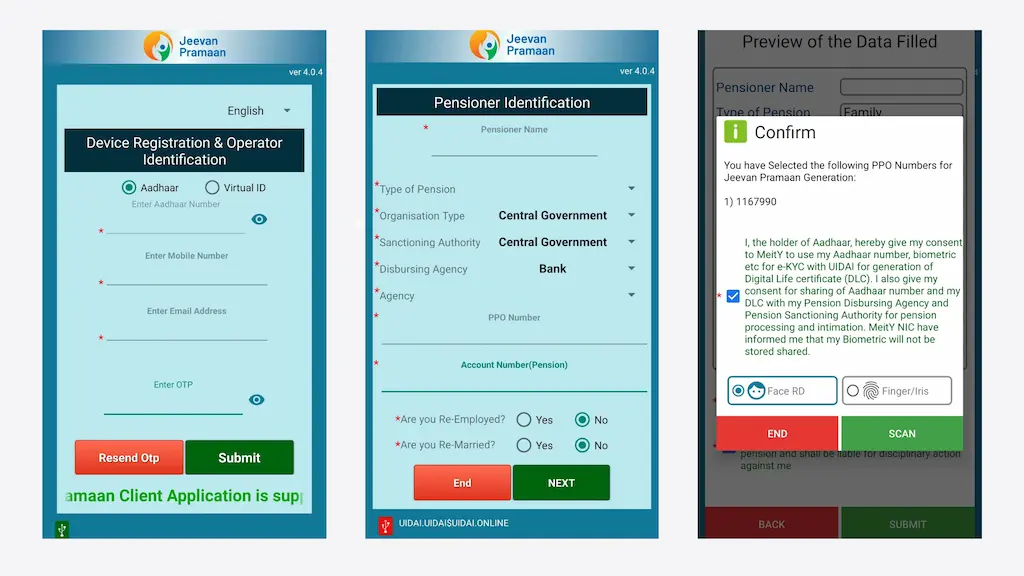
- Enter your Aadhaar Card Number, Mobile Number, and Email ID, then press the Submit button.
- Enter the OTP received and proceed. Fill in the Operator Name (enter your name).
- Complete your Face Scan, then fill in the Pensioner Name, Type of Pension, Type of Organisation, Disbursing Agency, PPO Number, and Pension Account Number, then click Next.
- Review all the details and click Submit, then complete your Face Scan again.
- Once the scanning process is complete, your Certificate Number, Pensioner Number, and Registration Number will appear on screen — note these down carefully.
- Download the generated certificate from the official website.
How to Download Your Jeevan Pramaan Certificate Online
If you want to download your Digital Life Certificate, follow these simple steps:

- First, visit https://jeevanpramaan.gov.in/.
- From the menu, click on the Pensioner Login option.
- Enter your Pramaan ID (the one you received when the certificate was generated).
- Enter the CAPTCHA code displayed on screen correctly.
- After filling in the CAPTCHA and Pramaan ID, click the Generate OTP button below.
- A One Time Password (OTP) will be sent to your registered mobile number.
- Enter the OTP and sign in to download your Jeevan Pramaan Certificate in PDF format.
How to Download the Jeevan Pramaan App
Follow these steps to download the Jeevan Pramaan app on your mobile or computer:

- Open the Play Store or App Store on your mobile device.
- Search for Jeevan Pramaan and install the app.
- Next, download the AadhaarFaceRd app as well.
- Once both apps are installed, you can complete the process of generating your Jeevan Pramaan Certificate.
- To download the Jeevan Pramaan client software for your computer or PC, go to the Download section on the official Jeevan Pramaan website.
- Enter your email ID and CAPTCHA code to get the download link, then click I Agree to Download.
- Shortly after, the download link will be sent to your Email ID.
- Click the link to download and install the app.
Note: The Jeevan Pramaan Android/iOS app does not require a separate biometric device.
How to Find Your Nearest Jeevan Pramaan Centre
Follow these steps to locate a Jeevan Pramaan centre near you:

- First, open the official Jeevan Pramaan website https://jeevanpramaan.gov.in/ on your mobile or computer.
- From the menu, click on Locate a Centre.
- Select your Location Type, State, and District accordingly.
- As soon as you enter the details, a list of all nearby Jeevan Pramaan centres will appear where you can get your certificate made.
Frequently Asked Questions
Jeevan Pramaan is an Aadhaar-based biometric Digital Life Certificate designed specifically for pensioners. Using their Aadhaar number and biometric data (fingerprint, iris scan, or face scan), pensioners can generate their Digital Life Certificate online.
Jeevan Pramaan is available only to pensioners whose Pension Sanctioning Authority (PSA) is registered with the Jeevan Pramaan portal. You can view the list of eligible authorities in the "Circulars" section on the official Jeevan Pramaan website.
To check the status of your Jeevan Pramaan Certificate (DLC), you need to download it from the jeevanpramaan.gov.in website. Only after downloading will you be able to confirm whether your certificate has been accepted or rejected.
Yes, an Aadhaar number is mandatory to generate or obtain a Jeevan Pramaan (Digital Life Certificate).
You can obtain your Digital Life Certificate (DLC) from the following places:
1. Any Common Service Centre (CSC).
2. Offices of pension disbursing agencies such as post offices, banks, treasuries, etc.
3. From home, using the Jeevan Pramaan client software.
If your Digital Life Certificate (DLC) is rejected, you should contact your Pension Disbursing Agency. This issue is often caused by incorrect information submitted by the pensioner.
To download the Jeevan Pramaan software for your computer or PC, visit the Download section on the official website. Enter your email ID and the CAPTCHA code, then click "I Agree to Download". A download link will then be sent to your email. Click the link to download and install the application.
For any problem related to your life certificate, you can call on 1800 111 555 or 0120-3076200, or email jeevanpramaan[at]gov[dot]in.
Helpline Number: 1800 111 555, 0120-3076200
Email: Jeevanpramaan[at]gov[dot]in
Address: 3rd Floor, National Informatics Centre, A Block, CGO Complex, Lodhi Road, New Delhi – 110003, India